Power & solar tracking
Keep your solar panel facing the sun
Set the panel tilt to 90 minus the sun’s elevation, then keep updating it in the Solar Generator’s own script. For a sun elevation of 60°, the target panel tilt is 30°.
Check which tilt command your installed build lists before copying the script below. Zero output at night is not a broken tracker, and falling efficiency near the horizon is not by itself proof of a script error.
On this page
1. Open the generator—not the uplink script
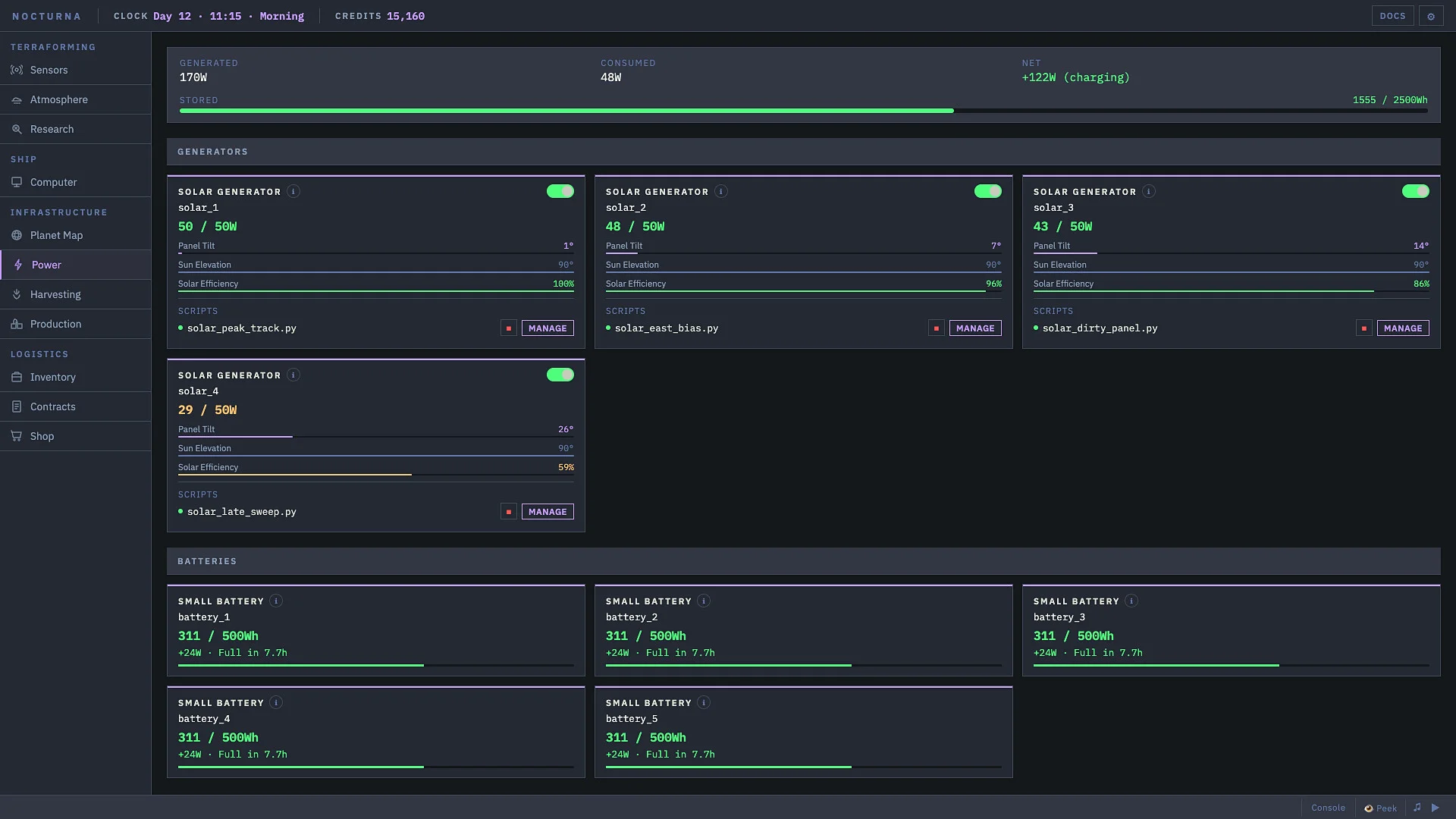
If no generator is deployed, follow the opening objective to buy the Solar Generator and Battery from the Shop and deploy them through Inventory. Then open Infrastructure → Power and use Manage beside the generator.
The general editor button can return you to a different script. Confirm the script belongs to the panel you want to control: the example uses self, meaning its host generator, not whichever component you last looked at.
Open that generator’s docs or autocomplete and look up its tilt setter. If your UI differs, use its current device-management entry rather than editing the old uplink.py file.
2. Run the in-game tracker
441ad76 lists set_tilt(degrees). An older tutorial uses set_tilt_degrees(degrees). That discrepancy does not establish when an API changed. Use the spelling your generator actually documents; do not run both calls.In-game script: paste this into the Solar Generator’s script only if its docs list set_tilt. This changes that panel’s angle; it does not buy or deploy equipment.
clock = get_component("clock")

while True:
    elevation = clock.get_elevation()
    self.set_tilt(90 - elevation)
If your build instead lists set_tilt_degrees, replace only the last line with self.set_tilt_degrees(90 - elevation). Keep the clock reading inside the loop: a value read only once cannot follow a moving sun.
Use capital True and indent the two loop lines. First resolve any missing-component, unknown-method, or syntax error. A correct formula cannot help if the script never reaches the tilt call.
3. Check the angle before judging the power
| Sun elevation | Target tilt | Calculation |
|---|---|---|
| 30° | 60° | 90 − 30 |
| 60° | 30° | 90 − 60 |
| 90° | 0° (flat) | 90 − 90 |
Compare the current clock elevation with the panel’s angle. The referenced API exposes tilt() and get_output() for angle and watts; use your build’s equivalent readouts if it differs.
The useful check is that the script stays running, the angle follows changing daylight elevation, and the generator produces power when sunlight is available. You do not need to rewrite the loop just because output varies across the day.
Zero output or less than 100%? Choose the right fix
- Night: the reference documents zero solar output. Check the clock’s phase and battery reserve; pointing the panel differently will not create sunlight.
- A stopped script or an unchanged angle: check the first console error, the script’s host, the setter name, and whether the clock read is inside the loop.
- Low output near sunrise or sunset: September 17–19 players reported efficiency falling toward the horizon even with tracking. That is a community observation, not a verified formula for your build. Check alignment at a brighter part of the day before treating it as a failed script.
- The panel works but the base still loses energy: tracking and supplying the whole base are different checks. Inspect total demand and stored energy before assuming the angle calculation is wrong.
No source here establishes an exact overnight battery count, a universal charging time, or 100% efficiency all day. Size storage from your own load rather than copying an unrelated base’s numbers.
See the editor and solar automation in context
Watch the game
Use Code to Terraform Distant Planets
Kerbo’s Early Access first look shows the game’s editor and solar automation. Use it to recognize the interface; use your installed generator’s docs for method names. It is not a step-by-step proof of the script above.
Return to the tracker steps →Sources for this guide
- Solar Generator reference and Clock reference, read September 28. The player-maintained documentation repository identifies build
441ad76and says it was rebuilt from the game’s exported documentation. It is not an official current-build guarantee or our own gameplay test. - Earlier solar tracker tutorial for the alternative setter spelling and opening flow. Its examples include older Demo/closed-test recordings.
- Player discussion: reopening the solar editor, September 19, for the Power/Manage entry and deployment prompt.
- Player discussion: solar efficiency, September 17–19. The replies describe lower output near the horizon; they do not establish a developer-confirmed output formula.